
Thief
Thief is a sanitized challenge note from the local HTB archive, organized for quick review by category, difficulty, evidence flow, and reusable operator
Scenario
Thief attack path
Thief is a sanitized challenge note from the local HTB archive, organized for quick review by category, difficulty, evidence flow, and reusable operator
Objective
Challenge walkthrough focused on Misc evidence, validation, and reusable operator lessons.
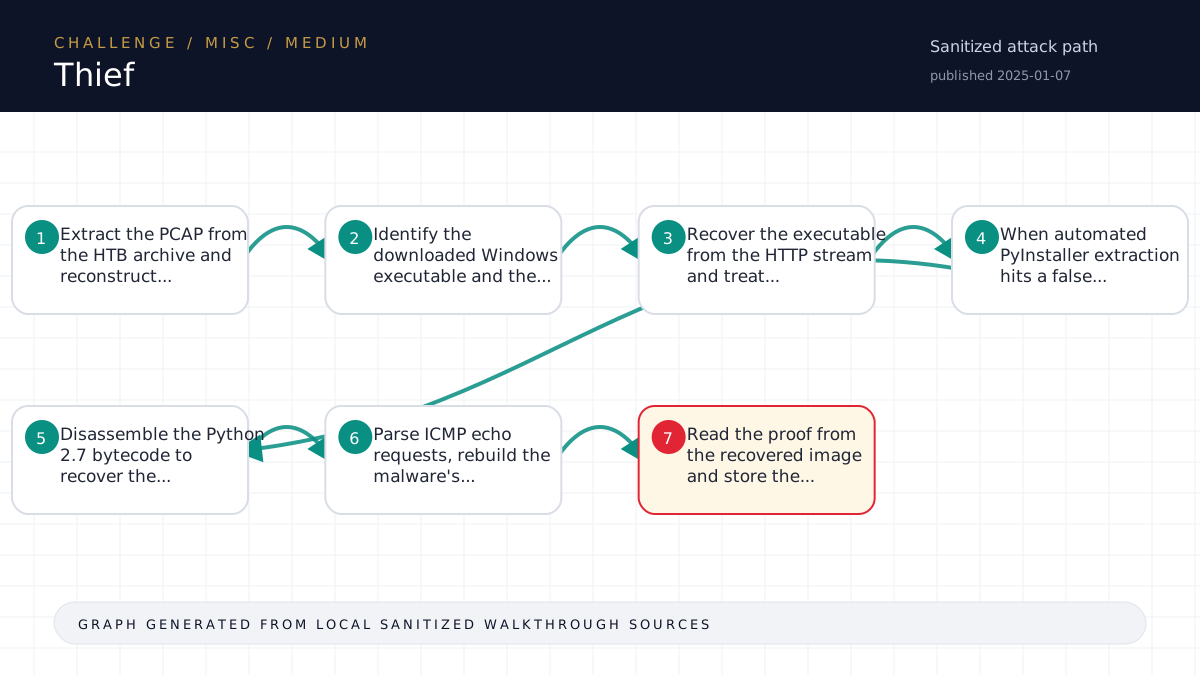
Walkthrough flow
Extract the PCAP from the HTB archive and reconstruct...
Identify the downloaded Windows executable and the...
Recover the executable from the HTTP stream and treat...
When automated PyInstaller extraction hits a false...
Disassemble the Python 2.7 bytecode to recover the...
Source coverage
High source coverage
Status: complete. This article is generated from 4 sanitized Markdown sources and keeps raw flags, credentials, keys, cookies, and reusable secrets out of the rendered blog.
High confidence: the page is reconstructed from a primary walkthrough plus multiple supporting notes or evidence sources. Treat the chain as source-backed, while still checking the listed source files for sensitive values.
- Misc/Thief/writeup.md
- htb-challenge/Misc/Thief/notes.md
- htb-challenge/Misc/Thief/memory-summary.md
- htb-challenge/Misc/Thief/hypothesis-board.md
Technical Walkthrough
Writeup
Challenge
- Name: Thief
- Category: Misc
- Difficulty: Medium
- Mode: file
Summary
The capture contained a victim PowerShell session that downloaded and ran a PyInstaller executable named windowsupdate.exe against 1dub.png. The executable exfiltrated the file in 48 ICMP echo request chunks. Reversing the embedded Python 2.7 bytecode exposed the AES-CBC key, chunk padding, and ICMP metadata scheme. Rebuilding the chunk order and decrypting the payloads recovered the stolen PNG containing the flag.
Artifact Inventory
files/a12c7350-80ac-4eb8-a7e9-ea96fff4fa07.zip: original HTB archive.files/extracted/misc_thief/challenge.pcap: packet capture containing the compromise and exfiltration.analysis/windowsupdate.exe: executable recovered from the HTTP transfer inside the PCAP.analysis/windowsupdate-manual-extracted/wixnvke: recovered Python 2.7 bytecode payload from the PyInstaller archive.loot/recovered/1dub.png: reconstructed stolen image containing the flag.
Analysis
Protocol triage showed the high-volume flow was mostly an HTTP transfer from <TARGET> to <TARGET>, plus ICMP traffic from the victim to <TARGET>. TCP stream reconstruction showed the victim ran windowsupdate.exe 1dub.png, then printed progress from 0 / 48 through 47 / 48 and a successful exfiltration message.
The HTTP body was saved as analysis/windowsupdate.exe. Manual PyInstaller extraction recovered a Python 2.7 code object, and analysis/xdis-disasm.txt showed the important behavior:
- split the input file into 256-byte chunks
- zero-pad each chunk to 256 bytes
- encrypt each chunk with AES-CBC using the embedded key string
- prepend a random IV and
exfil- - send the data through ICMP echo requests
- use ICMP
idandseqas ordering metadata after a custom tree scramble
The 48 ICMP echo request payloads matched that scheme exactly. Reproducing the tree metadata mapping allowed the solver to ignore randomized send order, restore original chunk order, decrypt each chunk, and trim the PNG at IEND.
Solve
Run:
python3 solve/solve.pyThe script parses challenge.pcap, extracts exfil- ICMP chunks, rebuilds the malware's ordering map, decrypts the AES-CBC chunks, and writes:
loot/recovered/1dub-recovered-full.binloot/recovered/1dub.pngloot/flag-candidate.txtwhen local OCR is available
The flag candidate was passed through:
python3 scripts/challenge_harness.py capture-flag Misc/Thief --from loot/flag-candidate.txtFlag
Raw flag is stored in loot/flag.txt and intentionally not reproduced here.
Lessons
- Randomized packet send order did not matter because the malware preserved enough metadata in ICMP
idandseqto reconstruct the original order. - PCAP-first reconstruction was faster and more reliable than trying to guess from packet payload entropy alone.
- PyInstaller extraction can fail on false signatures; checking the real archive cookie near EOF and manually extracting the CArchive avoided that blocker.
Source-Backed Dossier
The sections below are merged from companion Markdown notes for the same case. They are rendered after sanitization so the article stays precise without publishing raw flags, credentials, or target-specific secrets.
Notes
Scope
- Challenge: Thief
- Category: Misc
- Difficulty: Medium
- Mode: file
- Remote instance: none
- Start time: 2026-06-13T03:40:31Z
- Operator: harness
- State file:
challenge-state.json
Harness Status
- Current phase: see
challenge-state.json - Next allowed actions: see
next-action.json - Raw flags and sensitive material stay in
loot/only. Do not paste them here.
Artifact Inventory
| File | Size | SHA256 | Type | Notes |
|---|---|---|---|---|
files/a12c7350-80ac-4eb8-a7e9-ea96fff4fa07.zip | 11987790 | <hash redacted> | Zip archive data, at least v1.0 to extract, compression method=store | zip entries: 2 shown in artifact inventory JSON |
files/extracted/misc_thief/challenge.pcap | 12710386 | <hash redacted> | pcap capture file, microsecond ts (little-endian) - version 2.4 (Ethernet, capture length 262144) |
Evidence Ledger
| Time | Action | Output/File | Finding | Confidence | Next |
|---|---|---|---|---|---|
| 2026-06-13T03:40:31Z | harness init | challenge-state.json | Workspace initialized with deterministic state file | High | Inventory artifacts |
| 2026-06-13T03:40:31Z | artifact inventory | analysis/artifact-inventory.json | 1 artifact(s) inventoried | High | Build or update hypotheses |
| 2026-06-13T03:40:43Z | hypothesis recorded | hypothesis-board.md | Analyze the captured high-volume network requests to identify exfiltrated data or reconstructed files; derive the HTB flag from request payloads, headers, or transferred objects. | Medium | Extract the archive, identify pcap/log artifacts, run protocol statistics and search for HTB flag fragments or suspicious object transfers. |
| 2026-06-13T03:40:43Z | checkpoint recorded | analysis/checkpoint-triage-20260613T034043774353Z-3ab9d56d.md | Checkpoint for TRIAGE | High | Use checkpoint to drive next decision |
| 2026-06-13T03:41:15Z | artifact inventory | analysis/artifact-inventory.json | 2 artifact(s) inventoried | High | Build or update hypotheses |
| 2026-06-13T03:43:42Z | RAG query | analysis/rag/rag-query-20260613T034331749858Z-7e42912a.txt | RAG helper exited 0; output saved | Medium | Record retrieval tag and validation |
| 2026-06-13T03:52:28Z | research record | analysis/research/research-records.md | Research tagged MATCHED | Medium | Validate against current evidence |
| 2026-06-13T03:52:28Z | instrumentation plan | analysis/instrumentation-plan.md | Recover the file exfiltrated by the malware from challenge.pcap and extract the visible HTB flag. | High | Stop if ICMP metadata does not match the reconstructed tree mapping or decrypted output is not a PNG. |
| 2026-06-13T03:52:41Z | RAG record | analysis/rag-records.md | Retrieved memory tagged MISSING | Medium | Validate or reject with live evidence |
| 2026-06-13T03:52:41Z | evaluator | analysis/evaluator-20260613T035241944072Z-11573171.md | Proceed | High | Capture the candidate stored by solve/solve.py through the harness. |
| 2026-06-13T03:52:51Z | flag capture | loot/flag.txt | HTB-format flag captured; raw value kept in loot only | High | Write solution and run completion gate |
| 2026-06-13T03:55:54Z | flag capture | loot/flag.txt | HTB-format flag captured; raw value kept in loot only | High | Write solution and run completion gate |
| 2026-06-13T03:55:54Z | completion gate | challenge-state.json | Completion gate passed; state marked COMPLETE | High | Optional sanitized memory summary approval |
Key Findings
challenge.pcapcontains a PowerShell compromise session wherewindowsupdate.exeis downloaded and executed against1dub.png.- The executable was recovered from the HTTP stream and identified as a Python 2.7 PyInstaller payload.
- Recovered bytecode shows AES-CBC encryption, 256-byte zero-padded chunks, and ICMP echo request exfiltration with payload prefix
exfil-. - The PCAP contains 48 matching ICMP exfiltration chunks; ICMP
idandseqencode the scrambled chunk ordering. solve/solve.pyreconstructs the chunk order, decrypts the data, and rebuildsloot/recovered/1dub.png.- The raw flag was captured through the harness and is stored only in
loot/flag.txt.
RAG / Advisory Memory
RAG output is advisory only. Record evaluated retrievals with:
scripts/challenge_harness.py rag-record <workspace> --query "..." --tag MATCHED|PARTIAL|MISSING|<secret redacted>|GENERIC --validation "..."Secrets/Flags
Raw flags and sensitive material stay in loot/ only. Use scripts/challenge_harness.py capture-flag to validate and record flag capture without printing the value.
Memory Summary
Metadata
- Platform: HackTheBox Challenges
- Category: Misc
- Challenge: Thief
- Difficulty: Medium
- Source workspace:
<local workspace>
Validated Solve Chain
Concepts only. Do not include raw flags, reusable credentials, tokens, cookies, private keys, or live secrets.
- Extract the PCAP from the HTB archive and reconstruct TCP streams.
- Identify the downloaded Windows executable and the command that runs it against a local PNG.
- Recover the executable from the HTTP stream and treat it as a PyInstaller payload.
- When automated PyInstaller extraction hits a false
MEIsignature, locate the real CArchive cookie near EOF and manually extract the Python code object. - Disassemble the Python 2.7 bytecode to recover the exfiltration algorithm: 256-byte chunks, zero padding, AES-CBC, per-chunk IV,
exfil-ICMP payload prefix, and chunk metadata in ICMPidandseq. - Parse ICMP echo requests, rebuild the malware's tree-order mapping, decrypt the chunks, concatenate them, and trim the recovered PNG at the
IENDmarker. - Read the flag from the recovered image and store the raw value only through the harness-controlled loot flow.
Reusable Lessons
- In PCAP malware challenges, recover transferred executables from streams and reverse them before guessing payload transforms.
- ICMP
idandseqfields can encode exfiltration ordering metadata even when packet send order is randomized. - Rebuild the malware's transformation exactly, then write a solver that reconstructs the artifact from the PCAP.
Dead Ends
- Direct string searches across the PCAP, encrypted ICMP payloads, and recovered PNG bytes do not reveal the flag.
- Simple concatenation orders such as time order, ICMP sequence order, or ICMP ID order do not directly produce the stolen file before reversing the malware's scramble mapping.
Tool Quirks
pyinstxtractor-ngcan lock onto a falseMEImarker in a PyInstaller binary. Checking the real cookie near the end of the file and manually parsing the archive can recover the payload.- The visible flag is rendered in a pixel font; OCR may confuse a digit one with lowercase
i, so visual validation of the reconstructed PNG may still be needed.
Evidence Paths
analysis/tcp-stream-summary.txtanalysis/icmp-exfil-reconstruct-summary.txtanalysis/pyinstaller-cookie-search.txtanalysis/xdis-disasm.txtanalysis/thief-reconstruction.mdsolve/solve.pyloot/recovered/1dub.pngloot/flag.txt
Ingestion Decision
- Proposed for LightRAG: yes
- Requires user approval before ingestion: yes
Hypothesis Board
Keep no more than 3 active hypotheses on Easy/Medium and 5 on Hard unless the user explicitly asks for breadth.
| Rank | Path | Evidence | Missing Proof | Cheapest Validation | Confidence | Status |
|---|---|---|---|---|---|---|
| 1 | Analyze the captured high-volume network requests to identify exfiltrated data or reconstructed files; derive the HTB flag from request payloads, headers, or transferred objects. | Challenge scenario mentions high request volume and possible data compromise; archive likely contains a traffic capture or logs. | Extract the archive, identify pcap/log artifacts, run protocol statistics and search for HTB flag fragments or suspicious object transfers. | Medium | Active |
Closed Branches
| Branch | Evidence Tested | Failure Output | Reason Closed | Revisit Condition |
|---|
Technical analogy
How to remember this solve
Think of the challenge like a timed puzzle booth. If the task is too fast or repetitive for a person, the intended move is usually to write a small helper that performs the simple action perfectly.
For Thief, keep the mental model simple: identify the trusted assumption, prove it with the smallest safe test, then automate or repeat only the part that directly leads to the flag.