
Obscure
Obscure is a sanitized challenge note from the local HTB archive, organized for quick review by category, difficulty, evidence flow, and reusable operator
Scenario
Obscure attack path
Obscure is a sanitized challenge note from the local HTB archive, organized for quick review by category, difficulty, evidence flow, and reusable operator
Objective
Challenge walkthrough focused on Forensics evidence, validation, and reusable operator lessons.
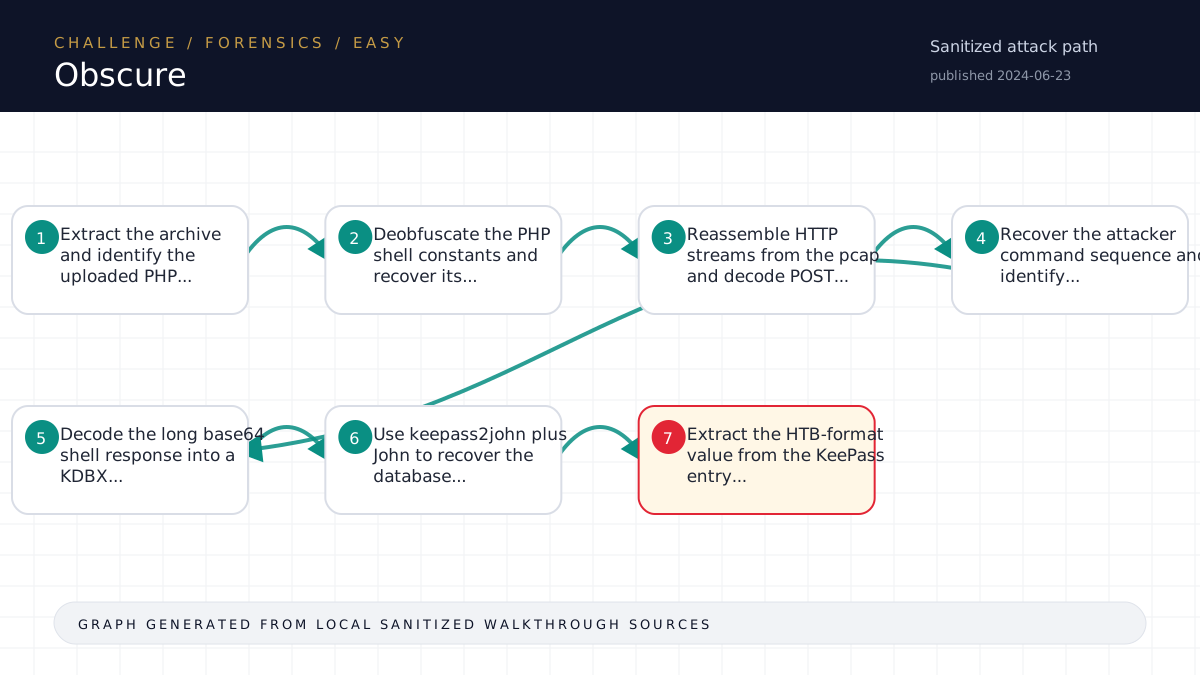
Walkthrough flow
Extract the archive and identify the uploaded PHP...
Deobfuscate the PHP shell constants and recover its...
Reassemble HTTP streams from the pcap and decode POST...
Recover the attacker command sequence and identify...
Decode the long base64 shell response into a KDBX...
Source coverage
High source coverage
Status: complete. This article is generated from 6 sanitized Markdown sources and keeps raw flags, credentials, keys, cookies, and reusable secrets out of the rendered blog.
High confidence: the page is reconstructed from a primary walkthrough plus multiple supporting notes or evidence sources. Treat the chain as source-backed, while still checking the listed source files for sensitive values.
- Forensics/Obscure/writeup.md
- htb-challenge/Forensics/Obscure/notes.md
- htb-challenge/Forensics/Obscure/memory-summary.md
- htb-challenge/Forensics/Obscure/hypothesis-board.md
- HTB/_knowledge/exports/ctf-lightrag-latest-203412/documents/challenge__Forensics__Obscure__memory-summary.md.71d39eb308.md
- HTB/_knowledge/exports/ctf-lightrag-latest-203412/documents/challenge__Forensics__Obscure__notes.md.859cd80c4b.md
Technical Walkthrough
Writeup
Challenge
- Name: Obscure
- Category: Forensics
- Difficulty: Easy
- Mode: file
Summary
The provided archive contained a packet capture, an uploaded support.php
webshell, and a short scenario note. The solve was to reverse the shell's
transport format, decode the captured attacker commands, reconstruct the
exfiltrated KeePass database, crack/open it, and extract the flag entry.
Artifact Inventory
Relevant files from analysis/artifact-inventory.json:
19-05-21_22532255.pcap: HTTP traffic from the two-minute incident window.support.php: obfuscated PHP command shell uploaded into/uploads/.to-do.txt: challenge scenario describing the webshell and tcpdump evidence.
Analysis
support.php deobfuscates into a small Weevely-style stager. It wraps request
payloads with a start and end marker, and wraps responses with a fixed prefix
plus the same marker scheme. The encoded payload is base64-decoded, XORed with
the recovered key, and zlib/gzip decompressed.
Using that decoder against the pcap produced four commands in
analysis/decoded-attacker-commands.md:
idfrom/var/www/html/uploads, proving command execution aswww-data.ls -lah /home/*, showing/home/developer/pwdb.kdbx.chdir('/home/developer'), confirming the attacker moved into that home directory.base64 -w 0 pwdb.kdbx, exfiltrating the KeePass database.
The sanitized decoded responses are in analysis/decoded-shell-responses.md.
The raw exfiltrated response is stored under loot/ because it contains the
stolen database material.
The base64 blob decoded to a valid KeePass 2.x KDBX file:
loot/pwdb.kdbx. keepass2john and John recovered the database password, and
pykeepass opened the database. The only relevant entry was titled Flag;
its password field contained the challenge flag.
Solve
The solve is automated in solve/solve.py.
Expected use from the challenge workspace:
. .venv/bin/activate
python solve/solve.py > analysis/solve-rerun-sanitized.txt
The script writes:
- decoded commands:
analysis/decoded-attacker-commands.md - sanitized decoded responses:
analysis/decoded-shell-responses.md - raw decoded shell responses:
loot/decoded-shell-responses-full.md - reconstructed KeePass DB:
loot/pwdb.kdbx - John hash/show output:
loot/pwdb.keepass.hash,loot/john-show.txt - redacted KeePass entry listing:
analysis/keepass-entries-redacted.txt - raw flag candidate:
loot/flag-candidate.txt
The harness captured the final value into loot/flag.txt.
Flag
Raw flag is stored in loot/flag.txt and intentionally not reproduced here.
Lessons
- For PHP webshell forensics, decode the uploaded shell first, then use its own
markers and crypto/compression scheme to parse network captures.
- Long base64 command output in shell traffic may be exfiltrated binary data,
not console text; file signatures after decoding quickly confirm the target
file type.
- Keep raw exfiltrated blobs, recovered <password redacted>, and raw flags in
loot/;
use redacted summaries in analysis/ and writeups.
Source-Backed Dossier
The sections below are merged from companion Markdown notes for the same case. They are rendered after sanitization so the article stays precise without publishing raw flags, credentials, or target-specific secrets.
Notes
Scope
- Challenge: Obscure
- Category: Forensics
- Difficulty: Easy
- Mode: file
- Remote instance: none
- Start time: 2026-06-10T13:43:51Z
- Operator: harness
- State file:
challenge-state.json
Harness Status
- Current phase: see
challenge-state.json - Next allowed actions: see
next-action.json - Raw flags and sensitive material stay in
loot/only. Do not paste them here.
Artifact Inventory
| File | Size | SHA256 | Type | Notes |
|---|---|---|---|---|
files/a12c736e-d35a-44b0-bce4-fcead468bdcd.zip | 220053 | <hash redacted> | Zip archive data, at least v2.0 to extract, compression method=deflate | zip entries: 3 shown in artifact inventory JSON |
Evidence Ledger
| Time | Action | Output/File | Finding | Confidence | Next |
|---|---|---|---|---|---|
| 2026-06-10T13:43:51Z | harness init | challenge-state.json | Workspace initialized with deterministic state file | High | Inventory artifacts |
| 2026-06-10T13:43:51Z | artifact inventory | analysis/artifact-inventory.json | 1 artifact(s) inventoried | High | Build or update hypotheses |
| 2026-06-10T13:43:51Z | hypothesis recorded | hypothesis-board.md | Decode the obfuscated PHP web shell and correlate tcpdump HTTP traffic to recover attacker commands and the compromised data/flag. | Medium | Extract artifacts, identify pcap/log formats, decode shell parameter/encoding scheme, reconstruct HTTP requests/responses, then extract command sequence and any HTB-format result. |
| 2026-06-10T13:43:51Z | research skip | analysis/research/research-skip.md | Research intentionally skipped with recorded reason | Medium | Gate before exploit |
| 2026-06-10T13:53:13Z | flag capture | loot/flag.txt | HTB-format flag captured; raw value kept in loot only | High | Write solution and run completion gate |
| 2026-06-10T13:55:36Z | sanitized solve rerun | analysis/solve-rerun-sanitized.txt | Solver reproduces 4 decoded commands, writes redacted response analysis, stores exfiltrated database and raw flag candidate under loot/ | High | Complete challenge |
| 2026-06-10T13:57:08Z | completion gate | challenge-state.json | Completion gate passed; state marked COMPLETE | High | Optional sanitized memory summary approval |
Key Findings
- The uploaded
support.phpis a Weevely-like PHP stager using marker-delimited, base64/XOR/zlib payloads. - The pcap contains four POST requests to
/uploads/support.php; all were decoded from the shell protocol. - Attacker activity, in order:
- confirmed execution as www-data with id;
- listed /home/* and found /home/developer/pwdb.kdbx;
- changed into /home/developer;
- exfiltrated pwdb.kdbx with base64 -w 0.
- The exfiltrated KeePass database was reconstructed into
loot/pwdb.kdbx. - John cracked the KeePass database password; the raw recovered password is kept in
loot/only. - The KeePass entry named
Flagcontained the HTB flag, captured toloot/flag.txt.
RAG / Advisory Memory
RAG output is advisory only. Record evaluated retrievals with:
scripts/challenge_harness.py rag-record <workspace> --query "..." --tag MATCHED|PARTIAL|MISSING|<secret redacted>|GENERIC --validation "..."Secrets/Flags
Raw flags and sensitive material stay in loot/ only. Use scripts/challenge_harness.py capture-flag to validate and record flag capture without printing the value.
Memory Summary
Metadata
- Platform: HackTheBox Challenges
- Category: Forensics
- Challenge: Obscure
- Difficulty: Easy
- Source workspace:
<local workspace>
Validated Solve Chain
Concepts only. Do not include raw flags, reusable credentials, tokens, cookies, private keys, or live secrets.
- Extract the archive and identify the uploaded PHP shell plus pcap incident window.
- Deobfuscate the PHP shell constants and recover its marker-delimited request/response protocol.
- Reassemble HTTP streams from the pcap and decode POST bodies to the uploaded shell path.
- Recover the attacker command sequence and identify the exfiltration command targeting a KeePass database.
- Decode the long base64 shell response into a KDBX file.
- Use
keepass2johnplus John to recover the database password, then open the database withpykeepass. - Extract the HTB-format value from the KeePass entry and capture it through the harness.
Reusable Lessons
- Webshell pcap challenges often require using the uploaded shell itself as the decoder specification.
- Weevely-style stagers commonly combine request/response markers, base64, XOR, and zlib/gzip compression.
- Long base64 output in decoded shell responses should be treated as possible binary exfiltration; decode and run
file. - Keep raw exfiltrated blobs, cracked <password redacted>, and flags in
loot/; publish only redacted summaries inanalysis/.
Dead Ends
- Direct string search in the pcap was insufficient because commands and responses were encoded by the shell transport.
- Looking for a plaintext flag in the decoded HTTP responses was insufficient; the flag was inside the exfiltrated KeePass database.
Tool Quirks
- Scapy was sufficient for TCP stream reconstruction in this pcap because each command/response stream was compact and sequence ordering was straightforward.
keepass2johnwas available through the Homebrewjohn-jumbopath rather than as a direct shell command.pykeepassgave a clean structured read of the database once the password was recovered.
Evidence Paths
analysis/deobfuscated-support.phpanalysis/decoded-attacker-commands.mdanalysis/decoded-shell-responses.mdanalysis/keepass-entries-redacted.txtsolve/solve.pyloot/pwdb.kdbxloot/flag.txt
Ingestion Decision
- Proposed for LightRAG: yes
- Requires user approval before ingestion: yes
Hypothesis Board
Keep no more than 3 active hypotheses on Easy/Medium and 5 on Hard unless the user explicitly asks for breadth.
| Rank | Path | Evidence | Missing Proof | Cheapest Validation | Confidence | Status |
|---|---|---|---|---|---|---|
| 1 | Decode the obfuscated PHP web shell and correlate tcpdump HTTP traffic to recover attacker commands and the compromised data/flag. | Scenario says attacker uploaded support.php and tcpdump logs cover the command activity window. | Extract artifacts, identify pcap/log formats, decode shell parameter/encoding scheme, reconstruct HTTP requests/responses, then extract command sequence and any HTB-format result. | Medium | Active |
Closed Branches
| Branch | Evidence Tested | Failure Output | Reason Closed | Revisit Condition |
|---|
Memory Summary
approval_required: true
Sanitized Memory Summary
Metadata
- Platform: HackTheBox Challenges
- Category: Forensics
- Challenge: Obscure
- Difficulty: Easy
- Source workspace:
<local workspace>
Validated Solve Chain
Concepts only. Do not include raw flags, reusable credentials, tokens, cookies, private keys, or live secrets.
- Extract the archive and identify the uploaded PHP shell plus pcap incident window.
- Deobfuscate the PHP shell constants and recover its marker-delimited request/response protocol.
- Reassemble HTTP streams from the pcap and decode POST bodies to the uploaded shell path.
- Recover the attacker command sequence and identify the exfiltration command targeting a KeePass database.
- Decode the long base64 shell response into a KDBX file.
- Use
keepass2johnplus John to recover the database password, then open the database withpykeepass. - Extract the HTB-format value from the KeePass entry and capture it through the harness.
Reusable Lessons
- Webshell pcap challenges often require using the uploaded shell itself as the decoder specification.
- Weevely-style stagers commonly combine request/response markers, base64, XOR, and zlib/gzip compression.
- Long base64 output in decoded shell responses should be treated as possible binary exfiltration; decode and run
file. - Keep raw exfiltrated blobs, cracked <password redacted>, and flags in
loot/; publish only redacted summaries inanalysis/.
Dead Ends
- Direct string search in the pcap was insufficient because commands and responses were encoded by the shell transport.
- Looking for a plaintext flag in the decoded HTTP responses was insufficient; the flag was inside the exfiltrated KeePass database.
Tool Quirks
- Scapy was sufficient for TCP stream reconstruction in this pcap because each command/response stream was compact and sequence ordering was straightforward.
keepass2johnwas available through the Homebrewjohn-jumbopath rather than as a direct shell command.pykeepassgave a clean structured read of the database once the password was recovered.
Evidence Paths
analysis/deobfuscated-support.phpanalysis/decoded-attacker-commands.mdanalysis/decoded-shell-responses.mdanalysis/keepass-entries-redacted.txtsolve/solve.pyloot/pwdb.kdbxloot/flag.txt
Ingestion Decision
- Proposed for LightRAG: yes
- Requires user approval before ingestion: yes
Notes
Notes
Scope
- Challenge: Obscure
- Category: Forensics
- Difficulty: Easy
- Mode: file
- Remote instance: none
- Start time: 2026-06-10T13:43:51Z
- Operator: harness
- State file:
challenge-state.json
Harness Status
- Current phase: see
challenge-state.json - Next allowed actions: see
next-action.json - Raw flags and sensitive material stay in
loot/only. Do not paste them here.
Artifact Inventory
| File | Size | SHA256 | Type | Notes |
|---|---|---|---|---|
files/a12c736e-d35a-44b0-bce4-fcead468bdcd.zip | 220053 | <hash redacted> | Zip archive data, at least v2.0 to extract, compression method=deflate | zip entries: 3 shown in artifact inventory JSON |
Evidence Ledger
| Time | Action | Output/File | Finding | Confidence | Next |
|---|---|---|---|---|---|
| 2026-06-10T13:43:51Z | harness init | challenge-state.json | Workspace initialized with deterministic state file | High | Inventory artifacts |
| 2026-06-10T13:43:51Z | artifact inventory | analysis/artifact-inventory.json | 1 artifact(s) inventoried | High | Build or update hypotheses |
| 2026-06-10T13: <REDACTED>, identify pcap/log formats, decode shell parameter/encoding scheme, reconstruct HTTP requests/responses, then extract command sequence and any HTB-format result. | |||||
| 2026-06-10T13:43:51Z | research skip | analysis/research/research-skip.md | Research intentionally skipped with recorded reason | Medium | Gate before exploit |
| 2026-06-10T13: <REDACTED> | |||||
2026-06-10T13: <REDACTED>, writes redacted response analysis, stores exfiltrated database and raw flag candidate under loot/ | High | Complete challenge | |||
| 2026-06-10T13:57:08Z | completion gate | challenge-state.json | Completion gate passed; state marked COMPLETE | High | Optional sanitized memory summary approval |
Key Findings
- The uploaded
support.phpis a Weevely-like PHP stager using marker-delimited, base64/XOR/zlib payloads. - The pcap contains four POST requests to
/uploads/support.php; all were decoded from the shell protocol. - Attacker activity, in order:
- confirmed execution as www-data with id;
- listed /home/* and found /home/developer/pwdb.kdbx;
- changed into /home/developer;
- exfiltrated pwdb.kdbx with base64 -w 0.
- The exfiltrated KeePass database was reconstructed into
loot/pwdb.kdbx. - John cracked the KeePass database password; the raw recovered password is kept in
loot/only. - The KeePass entry named
Flagcontained the HTB flag, captured toloot/flag.txt.
RAG / Advisory Memory
RAG output is advisory only. Record evaluated retrievals with:
scripts/challenge_harness.py rag-record <workspace> --query "..." --tag MATCHED|PARTIAL|MISSING|<secret redacted>|GENERIC --validation "..."Secrets/Flags
Raw flags and sensitive material stay in loot/ only. Use scripts/challenge_harness.py capture-flag to validate and record flag capture without printing the value.
Technical analogy
How to remember this solve
Think of the challenge as a small system with one rule that matters more than the rest. The solve is finding that rule, validating it, and using it carefully enough to reach the final proof.
For Obscure, keep the mental model simple: identify the trusted assumption, prove it with the smallest safe test, then automate or repeat only the part that directly leads to the flag.