
Diagnostics
Diagnostics is a sanitized challenge note from the local HTB archive, organized for quick review by category, difficulty, evidence flow, and reusable operator
Scenario
Diagnostics attack path
Diagnostics is a sanitized challenge note from the local HTB archive, organized for quick review by category, difficulty, evidence flow, and reusable operator
Objective
Challenge walkthrough focused on Forensics evidence, validation, and reusable operator lessons.
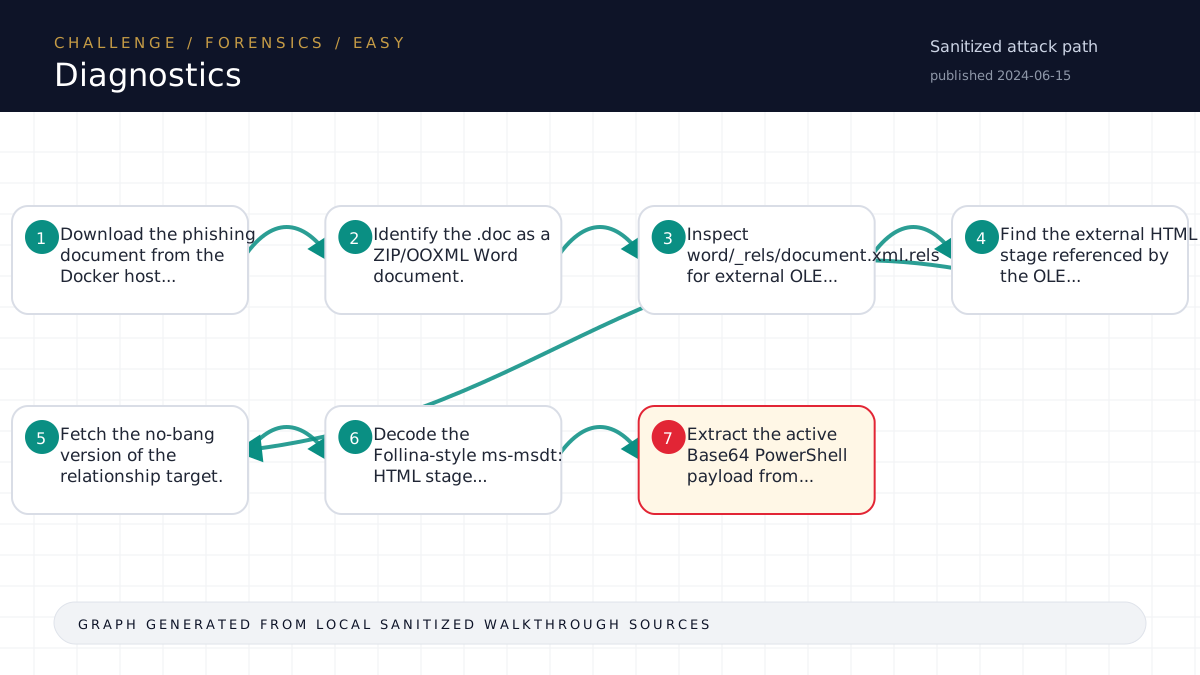
Walkthrough flow
Download the phishing document from the Docker host...
Identify the .doc as a ZIP/OOXML Word document.
Inspect word/_rels/document.xml.rels for external OLE...
Find the external HTML stage referenced by the OLE...
Fetch the no-bang version of the relationship target.
Source coverage
High source coverage
Status: complete. This article is generated from 6 sanitized Markdown sources and keeps raw flags, credentials, keys, cookies, and reusable secrets out of the rendered blog.
High confidence: the page is reconstructed from a primary walkthrough plus multiple supporting notes or evidence sources. Treat the chain as source-backed, while still checking the listed source files for sensitive values.
- Forensics/Diagnostics/writeup.md
- htb-challenge/Forensics/Diagnostics/notes.md
- htb-challenge/Forensics/Diagnostics/memory-summary.md
- htb-challenge/Forensics/Diagnostics/hypothesis-board.md
- HTB/_knowledge/exports/ctf-lightrag-latest-203412/documents/challenge__Forensics__Diagnostics__memory-summary.md.2a5d585dbd.md
- HTB/_knowledge/exports/ctf-lightrag-latest-203412/documents/challenge__Forensics__Diagnostics__notes.md.677c936552.md
Technical Walkthrough
Writeup
Challenge
- Name: Diagnostics
- Category: Forensics
- Difficulty: Easy
- Mode: remote
Summary
The phishing document is a DOCX/OOXML file disguised with a .doc extension. It does not contain macros. Instead, it uses an external OLE relationship to pull an HTML stage from diagnostic.htb. That HTML stage contains an ms-msdt: URI with an embedded Base64 PowerShell command. Static decoding and PowerShell format-string reconstruction reveals a flag-bearing payload filename.
Artifact Inventory
- Remote host:
<TARGET>:30790. files/layoffs.doc: downloaded phishing document, ZIP/OOXML format.files/extracted/: extracted OOXML parts from the document.files/223_index_style_fancy.html: active hosted HTML stage.analysis/solver/stage1-powershell-redacted.txt: decoded active PowerShell payload with flags redacted.analysis/solver/reconstructed-strings-redacted.txt: reconstructed PowerShell format strings with flags redacted.solve/solve.py: reproducible static solver.
Analysis
The scenario gave the URL diagnostic.htb/layoffs.doc, so the first step was to request the document from the Docker host while preserving evidence. The downloaded file is a ZIP archive, and unzip -l shows a small Word OOXML structure rather than a binary OLE macro document.
The important file is:
files/extracted/word/_rels/document.xml.relsIt contains an external OLE object relationship:
http://diagnostic.htb/223_index_style_fancy.html!Fetching the no-bang version of that URL returns an HTML stage. The stage assigns location.href to an ms-msdt: URI. Inside the URI, the active payload is a Base64 string passed to FromBase64String(...).
Decoding that Base64 gives PowerShell that reconstructs strings with the -f format operator. The first reconstructed string is a filename ending in .exe; the flag is embedded in that filename. No macro, MSDT URI, PowerShell, or downloaded executable was executed.
Solve
Run:
cd <local workspace>
python3 solve/solve.py
The solver:
- Parses
files/layoffs.docas a ZIP/OOXML document. - Reads
word/_rels/document.xml.rels. - Extracts the external OLE target and strips the trailing
!. - Uses the live Docker host with
Host: diagnostic.htbif the HTML stage needs to be fetched. - Extracts and decodes the active Base64 PowerShell payload.
- Emulates PowerShell
-fstring formatting. - Extracts the HTB-format flag from the reconstructed filename.
- Writes the flag candidate to
loot/flag-candidate.txt.
The harness captures the final flag to loot/flag.txt.
Flag
Raw flag is stored in loot/flag.txt and intentionally not reproduced here.
Lessons
- A
.docextension does not mean legacy OLE; inspect file type before choosing tooling. - Malicious Office docs may use external OOXML relationships instead of embedded macros.
- The trailing
!in the OLE relationship is part of Word's link syntax; the server stage may live at the no-bang path. - Follina-style payloads can be analyzed safely by decoding the
ms-msdt:URI and emulating PowerShell string operations statically.
Source-Backed Dossier
The sections below are merged from companion Markdown notes for the same case. They are rendered after sanitization so the article stays precise without publishing raw flags, credentials, or target-specific secrets.
Notes
Scope
- Challenge: Diagnostics
- Category: Forensics
- Difficulty: Easy
- Mode: remote
- Remote instance: <TARGET>:30790
- Start time: 2026-06-09T14:55:15Z
- Operator: harness
- State file:
challenge-state.json
Harness Status
- Current phase: see
challenge-state.json - Next allowed actions: see
next-action.json - Raw flags and sensitive material stay in
loot/only. Do not paste them here.
Artifact Inventory
| File | Size | SHA256 | Type | Notes |
|---|---|---|---|---|
files/layoffs.doc | 10701 | <hash redacted> | Zip archive data, at least v2.0 to extract, compression method=store |
Evidence Ledger
| Time | Action | Output/File | Finding | Confidence | Next |
|---|---|---|---|---|---|
| 2026-06-09T14:55:15Z | harness init | challenge-state.json | Workspace initialized with deterministic state file | High | Inventory artifacts |
| 2026-06-09T14:55:46Z | artifact inventory | analysis/artifact-inventory.json | 0 artifact(s) inventoried | High | Build or update hypotheses |
| 2026-06-09T14:56:02Z | hypothesis recorded | hypothesis-board.md | Use the stopped-DNS clue by requesting /layoffs.doc from the Docker host with Host: diagnostic.htb, then statically analyze the downloaded Office document for macros, embedded stages, URLs, or an HTB-format flag. | Medium | curl the document with and without Host: diagnostic.htb, save HTTP transcript and artifact under files/, then inventory the artifact before analysis. |
| 2026-06-09T14:56:02Z | checkpoint recorded | analysis/checkpoint-triage-20260609T145602604901Z-a9ad30c5.md | Checkpoint for TRIAGE | High | Use checkpoint to drive next decision |
| 2026-06-09T14:56:25Z | artifact inventory | analysis/artifact-inventory.json | 1 artifact(s) inventoried | High | Build or update hypotheses |
| 2026-06-09T14:56:25Z | research skip | analysis/research/research-skip.md | Research intentionally skipped with recorded reason | Medium | Gate before exploit |
| 2026-06-09T14:58:49Z | local memory record | analysis/local-memory-records.md | Prior local notes reviewed as fallback/advisory context | Medium | Validate against current evidence |
| 2026-06-09T14:59:05Z | evaluator | analysis/evaluator-20260609T145905967044Z-31a19054.md | Proceed | High | Run solve/solve.py, capture loot/flag-candidate.txt through the harness, and keep all analysis outputs redacted. |
| 2026-06-09T15:00:02Z | flag capture | loot/flag.txt | HTB-format flag captured; raw value kept in loot only | High | Write solution and run completion gate |
| 2026-06-09T15:01:25Z | completion gate | challenge-state.json | Completion gate passed; state marked COMPLETE | High | Optional sanitized memory summary approval |
Key Findings
- Remote service
<TARGET>:30790serveslayoffs.docfrom the phishing clue. files/layoffs.docis a ZIP-based Word/OOXML document, not a legacy OLE.docmacro file.- The document has no visible body text and no
vbaProject.bin; the suspicious behavior is in OOXML relationships. word/_rels/document.xml.relscontains external OLE relationshiprId996:
- Type: officeDocument/2006/relationships/oleObject
- Target: http://diagnostic.htb/223_index_style_fancy.html!
- TargetMode: External
- The relationship target with the trailing
!returned 404, but the no-bang path/223_index_style_fancy.htmlreturned the active HTML stage. - The HTML stage sets
location.hrefto anms-msdt:URI, matching Follina-style diagnostic handler abuse. - The
ms-msdt:URI embeds an active Base64 PowerShell payload inFromBase64String(...). - The decoded PowerShell reconstructs a payload filename with the
-fstring format operator. - The reconstructed filename contains the HTB-format flag; the solver extracts it statically without executing the document, MSDT URI, PowerShell, or binary.
- Reproducible solver:
solve/solve.py. - Raw flag captured by the harness and stored only in
loot/flag.txt.
RAG / Advisory Memory
RAG output is advisory only. Record evaluated retrievals with:
scripts/challenge_harness.py rag-record <workspace> --query "..." --tag MATCHED|PARTIAL|MISSING|<secret redacted>|GENERIC --validation "..."Secrets/Flags
Raw flags and sensitive material stay in loot/ only. Use scripts/challenge_harness.py capture-flag to validate and record flag capture without printing the value.
Memory Summary
Metadata
- Platform: HackTheBox Challenges
- Category: Forensics
- Challenge: Diagnostics
- Difficulty: Easy
- Source workspace:
<local workspace>
Validated Solve Chain
Concepts only. Do not include raw flags, reusable credentials, tokens, cookies, private keys, or live secrets.
- Download the phishing document from the Docker host using the
diagnostic.htbclue. - Identify the
.docas a ZIP/OOXML Word document. - Inspect
word/_rels/document.xml.relsfor external OLE relationships. - Find the external HTML stage referenced by the OLE relationship.
- Fetch the no-bang version of the relationship target.
- Decode the Follina-style
ms-msdt:HTML stage statically. - Extract the active Base64 PowerShell payload from
FromBase64String(...). - Emulate the PowerShell
-fstring format operator. - Extract the flag from the reconstructed payload filename.
Reusable Lessons
- Always inspect OOXML relationships for external targets when a malicious Office document has no macros.
- For OLE link targets ending in
!, try the same URL without!when fetching the hosted stage manually. - Follina-style
ms-msdt:payloads often hide the interesting string in Base64 PowerShell plus format-string reconstruction.
Dead Ends
- Treating the file as a legacy OLE macro document: not applicable; it is ZIP/OOXML.
- Fetching the relationship URL with the trailing bang: returned 404; the active stage is the no-bang path.
- Decoding long Base64 comment blobs in the HTML: they are decoy song lyrics, not the active payload.
Tool Quirks
- Optional tools such as
exiftool,binwalk, andolevbawere unavailable, but ZIP/XML/Python tooling was sufficient. - The harness remote-profile gate required local-memory fallback before a
Proceedevaluator, so<secret redacted>mdwas recorded as advisory context.
Evidence Paths
files/layoffs.docfiles/extracted/word/_rels/document.xml.relsfiles/223_index_style_fancy.htmlanalysis/remote/223_index_style_fancy-no-bang.htmlanalysis/solver/stage1-powershell-redacted.txtanalysis/solver/reconstructed-strings-redacted.txtsolve/solve.pyloot/flag.txt
Ingestion Decision
- Proposed for LightRAG: yes
- Requires user approval before ingestion: yes
Hypothesis Board
Keep no more than 3 active hypotheses on Easy/Medium and 5 on Hard unless the user explicitly asks for breadth.
| Rank | Path | Evidence | Missing Proof | Cheapest Validation | Confidence | Status |
|---|---|---|---|---|---|---|
| 1 | Use the stopped-DNS clue by requesting /layoffs.doc from the Docker host with Host: diagnostic.htb, then statically analyze the downloaded Office document for macros, embedded stages, URLs, or an HTB-format flag. | Scenario explicitly names diagnostic.htb/layoffs.doc and says DNS no longer resolves but the Docker server is still hosting the malicious document. | curl the document with and without Host: diagnostic.htb, save HTTP transcript and artifact under files/, then inventory the artifact before analysis. | Medium | Active |
Closed Branches
| Branch | Evidence Tested | Failure Output | Reason Closed | Revisit Condition |
|---|
Memory Summary
approval_required: true
Sanitized Memory Summary
Metadata
- Platform: HackTheBox Challenges
- Category: Forensics
- Challenge: Diagnostics
- Difficulty: Easy
- Source workspace:
<local workspace>
Validated Solve Chain
Concepts only. Do not include raw flags, reusable credentials, tokens, cookies, private keys, or live secrets.
- Download the phishing document from the Docker host using the
diagnostic.htbclue. - Identify the
.docas a ZIP/OOXML Word document. - Inspect
word/_rels/document.xml.relsfor external OLE relationships. - Find the external HTML stage referenced by the OLE relationship.
- Fetch the no-bang version of the relationship target.
- Decode the Follina-style
ms-msdt:HTML stage statically. - Extract the active Base64 PowerShell payload from
FromBase64String(...). - Emulate the PowerShell
-fstring format operator. - Extract the flag from the reconstructed payload filename.
Reusable Lessons
- Always inspect OOXML relationships for external targets when a malicious Office document has no macros.
- For OLE link targets ending in
!, try the same URL without!when fetching the hosted stage manually. - Follina-style
ms-msdt:payloads often hide the interesting string in Base64 PowerShell plus format-string reconstruction.
Dead Ends
- Treating the file as a legacy OLE macro document: not applicable; it is ZIP/OOXML.
- Fetching the relationship URL with the trailing bang: returned 404; the active stage is the no-bang path.
- Decoding long Base64 comment blobs in the HTML: they are decoy song lyrics, not the active payload.
Tool Quirks
- Optional tools such as
exiftool,binwalk, andolevbawere unavailable, but ZIP/XML/Python tooling was sufficient. - The harness remote-profile gate required local-memory fallback before a
Proceedevaluator, so<secret redacted>mdwas recorded as advisory context.
Evidence Paths
files/layoffs.docfiles/extracted/word/_rels/document.xml.relsfiles/223_index_style_fancy.htmlanalysis/remote/223_index_style_fancy-no-bang.htmlanalysis/solver/stage1-powershell-redacted.txtanalysis/solver/reconstructed-strings-redacted.txtsolve/solve.pyloot/flag.txt
Ingestion Decision
- Proposed for LightRAG: yes
- Requires user approval before ingestion: yes
Notes
Notes
Scope
- Challenge: Diagnostics
- Category: Forensics
- Difficulty: Easy
- Mode: remote
- Remote instance: <TARGET>:30790
- Start time: 2026-06-09T14:55:15Z
- Operator: harness
- State file:
challenge-state.json
Harness Status
- Current phase: see
challenge-state.json - Next allowed actions: see
next-action.json - Raw flags and sensitive material stay in
loot/only. Do not paste them here.
Artifact Inventory
| File | Size | SHA256 | Type | Notes |
|---|---|---|---|---|
files/layoffs.doc | 10701 | <hash redacted> | Zip archive data, at least v2.0 to extract, compression method=store |
Evidence Ledger
| Time | Action | Output/File | Finding | Confidence | Next |
|---|---|---|---|---|---|
| 2026-06-09T14:55:15Z | harness init | challenge-state.json | Workspace initialized with deterministic state file | High | Inventory artifacts |
| 2026-06-09T14:55:46Z | artifact inventory | analysis/artifact-inventory.json | 0 artifact(s) inventoried | High | Build or update hypotheses |
| 2026-06-09T14: <REDACTED>, then statically analyze the downloaded Office document for macros, embedded stages, URLs, or an HTB-format flag. | Medium | curl the document with and without Host: <REDACTED>, save HTTP transcript and artifact under files/, then inventory the artifact before analysis. | |||
| 2026-06-09T14:56:02Z | checkpoint recorded | analysis/checkpoint-triage-20260609T145602604901Z-a9ad30c5.md | Checkpoint for TRIAGE | High | Use checkpoint to drive next decision |
| 2026-06-09T14:56:25Z | artifact inventory | analysis/artifact-inventory.json | 1 artifact(s) inventoried | High | Build or update hypotheses |
| 2026-06-09T14:56:25Z | research skip | analysis/research/research-skip.md | Research intentionally skipped with recorded reason | Medium | Gate before exploit |
| 2026-06-09T14:58:49Z | local memory record | analysis/local-memory-records.md | Prior local notes reviewed as fallback/advisory context | Medium | Validate against current evidence |
| 2026-06-09T14: <REDACTED>, capture loot/flag-candidate.txt through the harness, and keep all analysis outputs redacted. | |||||
| 2026-06-09T15: <REDACTED> | |||||
| 2026-06-09T15:01:25Z | completion gate | challenge-state.json | Completion gate passed; state marked COMPLETE | High | Optional sanitized memory summary approval |
Key Findings
- Remote service
<TARGET>:30790serveslayoffs.docfrom the phishing clue. files/layoffs.docis a ZIP-based Word/OOXML document, not a legacy OLE.docmacro file.- The document has no visible body text and no
vbaProject.bin; the suspicious behavior is in OOXML relationships. word/_rels/document.xml.relscontains external OLE relationshiprId996:
- Type: officeDocument/2006/relationships/oleObject
- Target: http://diagnostic.htb/223_index_style_fancy.html!
- TargetMode: External
- The relationship target with the trailing
!returned 404, but the no-bang path/223_index_style_fancy.htmlreturned the active HTML stage. - The HTML stage sets
location.hrefto anms-msdt:URI, matching Follina-style diagnostic handler abuse. - The
ms-msdt:URI embeds an active Base64 PowerShell payload inFromBase64String(...). - The decoded PowerShell reconstructs a payload filename with the
-fstring format operator. - The reconstructed filename contains the HTB-format flag; the solver extracts it statically without executing the document, MSDT URI, PowerShell, or binary.
- Reproducible solver:
solve/solve.py. - Raw flag captured by the harness and stored only in
loot/flag.txt.
RAG / Advisory Memory
RAG output is advisory only. Record evaluated retrievals with:
scripts/challenge_harness.py rag-record <workspace> --query "..." --tag MATCHED|PARTIAL|MISSING|<secret redacted>|GENERIC --validation "..."Secrets/Flags
Raw flags and sensitive material stay in loot/ only. Use scripts/challenge_harness.py capture-flag to validate and record flag capture without printing the value.
Technical analogy
How to remember this solve
Think of the challenge as a small system with one rule that matters more than the rest. The solve is finding that rule, validating it, and using it carefully enough to reach the final proof.
For Diagnostics, keep the mental model simple: identify the trusted assumption, prove it with the smallest safe test, then automate or repeat only the part that directly leads to the flag.